See your whole workshop on one screen. Track every lira down to the last kuruş.
Open a work order by plate, assign a technician, add parts by barcode. When the job closes, receivables and profit are worked out for you; every payment you take goes into the cash book.
- Built for independent garages in Türkiye
- Your data is hosted in Germany
- No tracking cookies
- 00 PST 026 · Brake pads · Kerem (technician)
- 00 TST 118 · Waiting for parts · Alternator
- Cash book · +₺18,400 · cash
- Stock · 5W-30 · below minimum
- Appointment · 2:30 pm · Scheduled service
- 00 DMO 41 · Repaired, ready for handover
- Payment · 00 PST 026 · card · receipt printed
- Quote · 00 KRT 07 · approved by phone
Three questions every workshop asks every day. The answers are now on screen.
What will you actually see? Follow one car through one day.
A car rolls in in the morning; by evening it's paid for and gone. This is what's on your screen at every step.
- 8:40 am
Type the plate and the car and its owner come up. Mileage, fuel or charge level and the customer's complaint go on record.
- 4 steps across the top: Vehicle · Customer · Line items · Confirm
- The plate field suggests as you type and finds old plates too
- Fuel level, mileage and complaint on one screen
Check-in takes 4 steps.
- 9:10 am
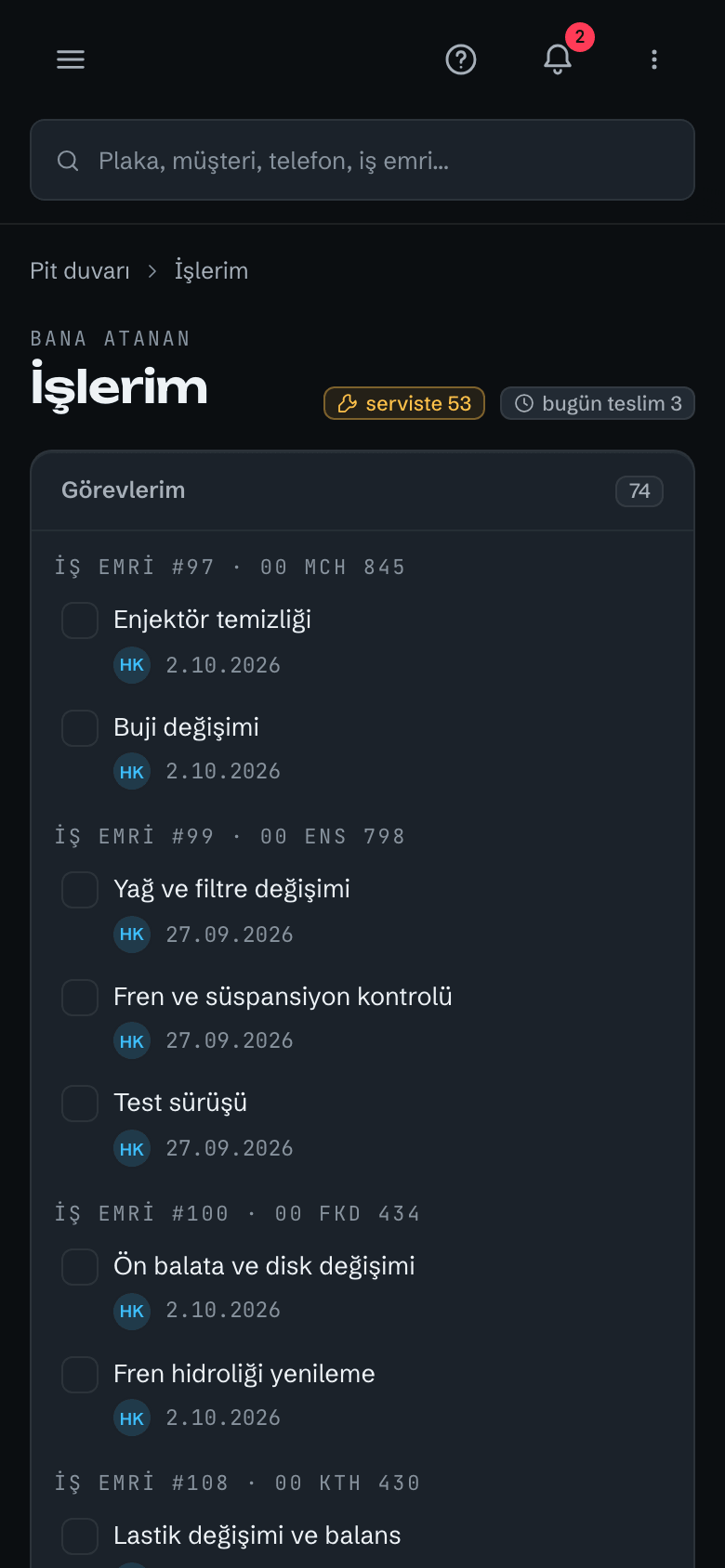
Save it as a quote or start the job straight away. Assign a technician; they see it on their own phone under "My work".
- Status: Under inspection
- Assigned technician and tasks
- Need a quote? Print it as a PDF
Customer approved by phone or in person? You mark it.
- 10:30 am
Add parts by barcode or stock code. Labour stays on its own line; discount and VAT are calculated for you.
- The part comes from stock and is reserved for this job
- A separate labour line
- Subtotal, discount, VAT, total
If a part drops to its minimum, the app lets you know.
- 3:20 pm
On a computer, drag the card or use the status picker to set it to "Repaired"; the Home screen updates. Print the work order form with your logo for the customer.
- Status: Repaired, hand over the vehicle
- Cost & profit tab: what this job left you
- Change history: who changed what, and when
Only people with permission see the cost & profit tab.
- 3:35 pm
Cash, card, bank transfer or cheque: pick the method, print the receipt. Anything unpaid waits under receivables; cash and profit update on their own.
- The cash counter goes up
- Open receivables shrink
- Payment receipt as a PDF with your logo
Your cash book is always up to date.
- Months later
The job goes into the car's service history. When the car comes back, type the plate and its whole history is in front of you.
- Service history: when, at what mileage, what was done
- Meter history
- Found even after a plate change
A car's whole story on one page.
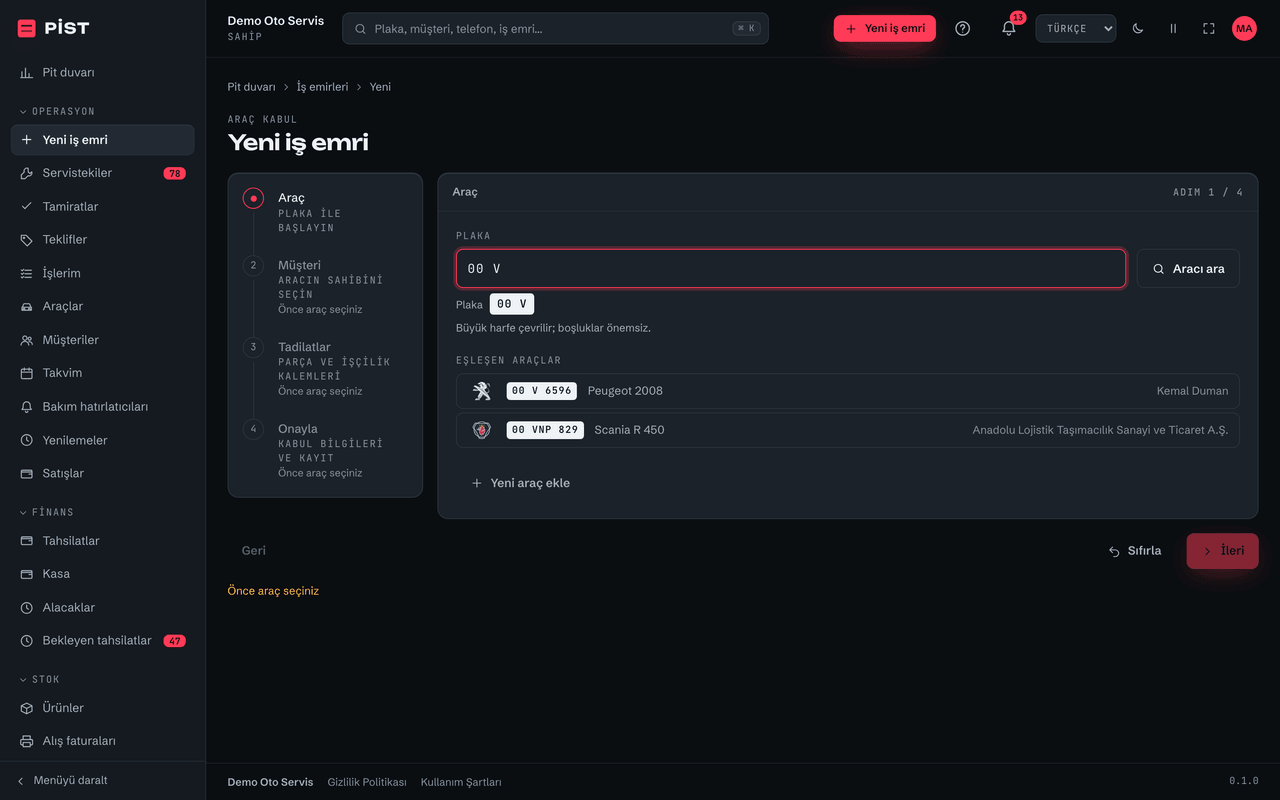
Step 1 of 6
The car arrives
Type the plate and the car and its owner come up. Mileage, fuel or charge level and the customer's complaint go on record.
- 4 steps across the top: Vehicle · Customer · Line items · Confirm
- The plate field suggests as you type and finds old plates too
- Fuel level, mileage and complaint on one screen
Check-in takes 4 steps.
Run this day in your own workshop.
One form is all it takes to open your first work order.
Your team sees their work. You see the prices and the profit.
One work order, four pairs of eyes. Switch the role and watch the screen change.
Sees everything: prices, costs, profit, cash, audit log and licence. Licence, business identity, merging customers, personal-data exports and anonymisation are owner-only.
Technicians can't see prices: they aren't just hidden on screen, they're never sent to the technician's phone.
| Permission | Owner | Advisor | Technician | Accountant |
|---|---|---|---|---|
| Open work orders | yes | yes | no | no |
| Change status | yes | yes | own | no |
| View prices | yes | yes | no | yes |
| See cost & profit | yes | no | no | yes |
| Collect payment | yes | own | no | yes |
| Cash book | yes | no | no | yes |
| Audit log | yes | no | no | yes |
The manager can do almost everything the owner does. Licence, business identity, merging customers, personal-data exports and deletion (anonymisation), and messaging settings stay with the owner.
Owner view: prices, cost and profit shown.5 roles · 59 permissions
From check-in to cash, the workshop's daily work.
13 areas, one account. It's all connected: a part added to a job is reserved in stock, and a payment you take lands in the cash book.
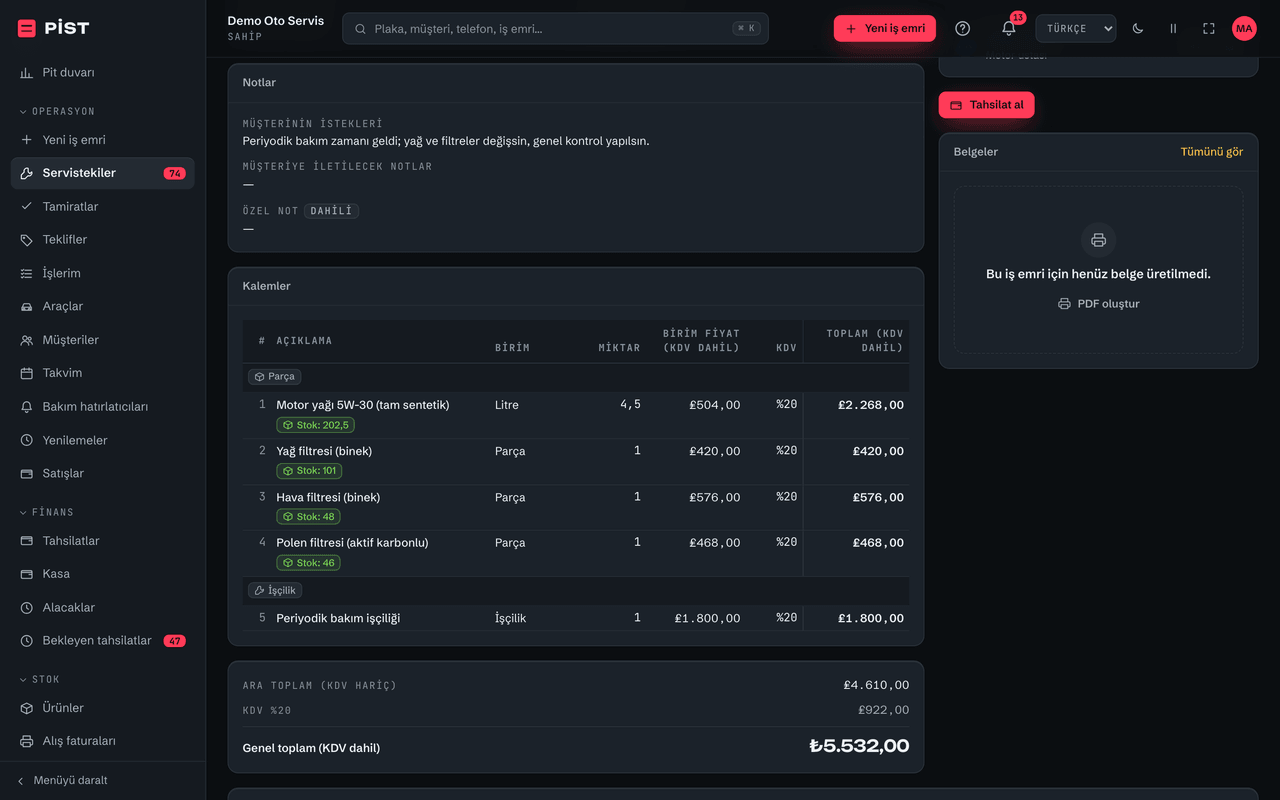
Work orders & quotes
- 4-step check-in: vehicle, customer, line items, confirm
- Parts and labour on separate lines; discount and VAT calculated
- Cancel and restore, full change history
From cars to tractors, motorbikes to diggers.
533 brands are ready in the catalogue. You choose the meter unit: kilometres, miles or operating hours.
A brand can appear under more than one type, so the type counts don't add up.
Kilometres, miles or operating hours
For tractors and construction machines you can keep the meter in operating hours; you can change the unit later.
Charge level for EVs
Petrol, diesel, LPG, hybrid or electric. For EVs, check-in records the charge level instead of fuel.
Brand names and logos belong to their owners and are used only to identify the vehicle's make.
Not a customer count. The product itself.
PİST is new. Instead of counting users, we count what you get. Every number has a source.
These numbers describe the product. They are not a user or customer count.
- 4 steps to check a vehicle in, from plate to confirmationIntake wizard
- 533 vehicle brands in the catalogueBrand catalogue
- 7 vehicle types, from cars to construction machinesVehicle types
- 19 ready-made reports, Excel & PDFReport catalogue
- 8 document types, as PDFDocument templates
- 4 payment methods set up out of the boxCash settings
Moving from your old program
You don't have to start from scratch.
Your stock list: from Excel, by yourself
Upload your product list from Excel and check it row by row before saving. Your autocomplete dictionary goes in and out via Excel too.
You can't upload customer or vehicle lists from Excel today, only the product list and dictionary.
Where your records live and who can see them, stated plainly.
Security isn't a slogan, it's a list. Here's ours.
In Germany, inside the EU
Our servers are in a data centre in Falkenstein, Germany.
Always encrypted
The site only runs over an encrypted connection. Unencrypted requests are redirected, and your browser remembers that.
Workshops kept apart
No other workshop can see your records. The separation is built into the database itself, not just the screen.
Who changed what, on record
An audit log and a change history on every work order. "Who changed this?" always has an answer.
Forgotten sessions, closed remotely
See open sessions and end them remotely. A screen left open at the counter signs itself out after 30 minutes of inactivity by default; you set the time.
No cookies tracking you
No ad or analytics scripts on this site. Cookies are only for your session and preferences.
In Germany, inside the EU
Our servers are in a data centre in Falkenstein, Germany.
Always encrypted
The site only runs over an encrypted connection. Unencrypted requests are redirected, and your browser remembers that.
Workshops kept apart
No other workshop can see your records. The separation is built into the database itself, not just the screen.
Who changed what, on record
An audit log and a change history on every work order. "Who changed this?" always has an answer.
Forgotten sessions, closed remotely
See open sessions and end them remotely. A screen left open at the counter signs itself out after 30 minutes of inactivity by default; you set the time.
No cookies tracking you
No ad or analytics scripts on this site. Cookies are only for your session and preferences.
Can you take your records into Excel?
- All 19 reports and your product list download to Excel, up to 5,000 rows at a time; split long periods.
- If a customer asks for their personal data, you can prepare their archive in a single file.
- When a licence expires your account becomes read-only, so your records aren't deleted.
- A full export of all records in one file isn't available yet.
Before every release we run more than 10,000 automated tests and an automated accessibility check.
At the counter, in the pit, on the road: the same PİST.
Nothing to download. Open it in your phone's browser and the screen fits your phone.
Cards, not tables
On the phone, lists open as cards, with no sideways scrolling.
Buttons sized for fingers
Buttons are big enough to hit comfortably with a thumb.
Technicians carry their jobs
"My work" shows the cars and tasks assigned to them.
Appointments in your phone's calendar
Connect your calendar once; new appointments show up there when your calendar app refreshes.
Search from the keyboard
On a computer, ⌘K (Ctrl K on Windows) searches everything: plate, customer, phone, record number.
We also list what we can't do yet.
Nobody wants surprises when choosing software. Here's what PİST doesn't do today.
What PİST doesn't do today8
- It doesn't send SMS, WhatsApp or email to customers. Templates and consent records are ready; connecting a messaging provider is on our roadmap.
- It doesn't issue Turkish e-invoices (e-Fatura / e-Arşiv). You issue invoices via the GİB portal or your integrator.
- No photos on vehicles or work orders.
- No app-store app; it runs in your phone's browser.
- No page where customers approve quotes or book appointments themselves.
- No cheque or promissory-note due-date tracking; cheques are recorded only as a payment method.
- You can't upload customer or vehicle lists from Excel, only the product list and dictionary.
- It doesn't work without an internet connection.
What PİST doesn't do today
- It doesn't send SMS, WhatsApp or email to customers. Templates and consent records are ready; connecting a messaging provider is on our roadmap.
- It doesn't issue Turkish e-invoices (e-Fatura / e-Arşiv). You issue invoices via the GİB portal or your integrator.
- No photos on vehicles or work orders.
- No app-store app; it runs in your phone's browser.
- No page where customers approve quotes or book appointments themselves.
- No cheque or promissory-note due-date tracking; cheques are recorded only as a payment method.
- You can't upload customer or vehicle lists from Excel, only the product list and dictionary.
- It doesn't work without an internet connection.
Questions you might have
Does PİST cost anything?
We're in early access, and PİST is free right now: no time limit, no user limit, no card required. We'll let you know before any paid period begins. If a licence expires, your account becomes read-only, so your records aren't deleted.
Do I need to install anything? What devices does it run on?
Nothing to install. Open it in the browser on your computer or phone. Sign-up is one form: your name, phone number, password and business name.
Can I bring records over from my old program?
You can import your stock list from Excel yourself, with a preview. You can't upload customer or vehicle lists from Excel today, only the product list and dictionary.
What happens if the internet goes down?
PİST runs over the internet; without a connection you can't save records. You can carry on using your phone's mobile data, with no app to download. If your computer breaks, your records aren't lost; they live on the server, not on your computer.
Is my data safe?
It's stored in Germany. The connection is always encrypted. No other workshop can see your records. Who changed what is on record. You can end sessions remotely. No cookies track you.
Will my technicians see prices and profit?
No. Technicians see only the jobs assigned to them. Prices, totals and profit are never sent to their screen. Advisors see selling prices but not purchase cost or profit.
Will my customers get automatic SMS or WhatsApp messages?
Not today. Templates and consent records are ready; connecting a messaging provider is on our roadmap. Until then, reminders come to you in the app. You mark how a customer answered a quote (phone, WhatsApp, in person).
Can I issue e-invoices? Which market is PİST built for?
PİST is built for independent garages in Türkiye; VAT rates (KDV) and documents follow Turkish practice. It doesn't issue e-invoices (e-Fatura) today. You do that via the GİB portal or your integrator, while PİST keeps your work orders, payments and receivables in order. We're considering e-invoicing; no dates.
Is it hard to learn?
Type the plate and the car comes up. Check-in is 4 steps. Technicians see only their own jobs. It works on a phone too.
What happens to my records if I stop?
When a licence expires your account becomes read-only, so your records aren't deleted. All 19 reports and your product list download to Excel, up to 5,000 rows at a time. A full export in one file isn't available yet.
Does it handle tractors, construction machines and motorbikes?
Yes. 7 vehicle types and 533 brands are ready. For tractors and construction machines you can keep the meter in operating hours. EVs record charge level instead of fuel.
PİST is new. What if it shuts down?
PİST is new, and we don't hide it. We list our gaps openly on this page. You can take your records into Excel as reports and a product list.
Open your first work order today.
Nothing to install. Open your account with one form, bring your stock list over from Excel, and start on your phone.
We're in early access: be one of our first workshops. We'll let you know before any paid period begins.